All AI Tools Included
This SOP explains the complete system architecture and operational workflow used to deliver AI-enabled communication for client accounts, covering:
AI Voice Receptionist (Inbound)
AI Outbound Calling Agent
AI SMS/Text Agent
AI Scheduling & CRM Updates
Phone number rotation system
Retell AI integration
n8n automation logic
Google Sheet data source
GHL workflows + inbound/outbound call routing
Website knowledge base via web crawler
This SOP is written for both Operations and Developers, providing:
Business-level explanations
Developer architecture, flows, and payload structures
Real scenarios
Error handling & failover
Integration notes per tool
Tool Introductions
Before describing the system, each tool must be formally introduced
What is Retell AI?
Retell AI is a programmable real-time voice agent engine used for inbound conversational AI, outbound calling campaigns, voice cloning, AI appointment booking, sending call results via webhooks, and passing structured call summaries to GHL. Retell AI is responsible for the voice conversation only. It does not manage dispositions, CRM logic, or workflow routing.
What is n8n?
n8n is a workflow automation engine used as the "middle layer" between GHL, Retell, Google Sheets, and Webhooks. In this SOP, n8n does exactly two things: Selects the outbound caller ID using the Google Sheet rotation logic, and sends the outbound call initiation request to Retell AI with the selected number. n8n DOES NOT handle dispositions, opportunity updates, or status mapping. These are all handled inside GHL automatically.
What is Google Sheets Used For?
Google Sheets stores the rotating list of outbound numbers. It includes: Number list, Status (Active/Paused), Last used, Usage count, and Notes. n8n reads this sheet to select which number should be used next.
What is GHL Used For?
GoHighLevel manages inbound call routing, inbound SMS routing, conversation assignment, outbound workflow triggers, updating contact records, pipeline stage movement, and disposition logic. IMPORTANT: GHL automatically assigns dispositions based on Retell's webhook results + your GHL workflow rules. n8n does NOT assign dispositions.
Full System Overview (End-to-End)
This describes exactly how the entire ecosystem operates in real-life scenarios
Inbound Call Scenario (Voice Receptionist)
Scenario: A lead calls the business number displayed on the website.
Flow:
- Lead dials business number (GHL phone system)
- GHL routes it to GHL Voice AI or Retell inbound agent
- AI answers using knowledge base (web crawler) and company personality profile
- AI responds to questions, books appointments, takes messages
- Retell sends webhook after call → GHL
- GHL saves call summary, transcription, intent tags
- GHL workflow updates contact status, pipeline stage, disposition
- No n8n involvement in inbound calls
Outbound Call Scenario (Number Rotation Included)
Scenario: Lead fills a form "Request a Callback" → automated outbound call needed.
Flow:
- Lead enters workflow in GHL
- GHL workflow triggers HTTP POST → n8n with lead name, phone number, campaign type, any tags
- n8n receives the request and performs: Fetch Google Sheet, Filter rows with Status = Active, Select number using rotation logic, Return selected number
- n8n sends outbound call request to Retell with lead phone number, rotated outbound caller ID, assigned agent ID
- Retell calls the lead
- After call: Retell webhook POST → GHL includes summary, confidence score, intent
- GHL automatically assigns disposition, pipeline stage, tags, opportunity updates
- Outcomes and dispositions are handled by GHL, not n8n
SMS/Text Scenario
Scenario: Lead texts the business number asking for support.
Flow:
- SMS received → GHL
- GHL assigns to SMS AI agent
- AI reads conversation thread, knowledge base, lead history
- Responds in natural language
- Any intent triggers → move workflow or pipeline
- n8n is not involved unless you require number rotation for outbound SMS (optional) or need automation to trigger SMS sequences
Developer Architecture
Below are the components developers must implement and maintain
n8n Workflow Architecture
Purpose: Initiate outbound calls, Perform number rotation
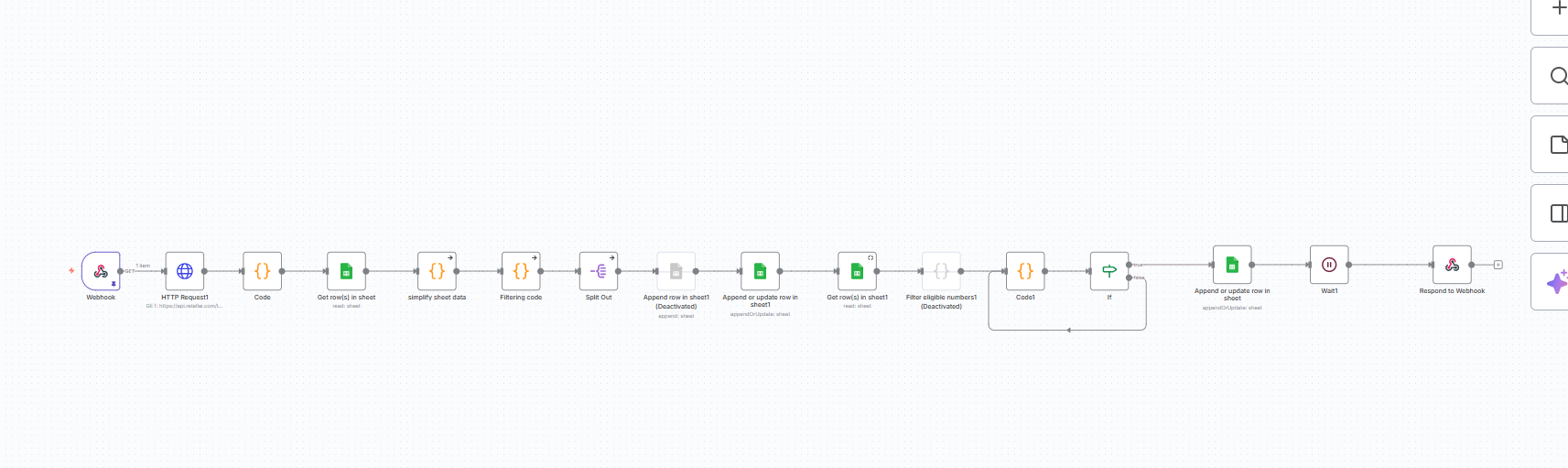
Steps (Developer):
HTTP Trigger
Receives JSON from GHL with lead information including name, phone number, campaign type, and tags.
- Receives POST request from GHL
- Extracts lead data from JSON payload
- Validates required fields
- Passes data to next node
{
  "lead_name": "John Doe",
  "lead_phone": "+1305552341",
  "campaign": "first-touch"
}Google Sheets Node
Reads the Google Sheet containing phone numbers, filters for Active status, and retrieves usage data.
- Connects to Google Sheets API
- Reads phone number list
- Filters rows with Status = Active
- Retrieves last_used and usage_count
Rotation Logic (Code Node)
Implements FIFO selection algorithm to pick the least recently used eligible number based on cooldown and daily limits.
- Filters active numbers
- Checks cooldown period (8 minutes)
- Checks daily limit (50 calls)
- Selects oldest last_used number
// Pseudocode
const rows = items;
const active = rows.filter(r => r.status === "Active");
const next = active.sort((a, b) =>
  a.last_used - b.last_used
)[0];
return [{
  json: {
    selected_number: next.number
  }
}];Update Google Sheet
Writes new last_used timestamp and increments usage_count for the selected number.
- Updates last_used timestamp
- Increments usage_count
- Disables if limit reached
- Saves changes to sheet
HTTP Request → Retell AI
Sends outbound call request to Retell AI API with selected caller ID and lead information.
- POST to Retell API endpoint
- Includes agent_id
- Includes customer_phone_number
- Includes rotated caller_id_number
{
  "agent_id": "YOUR_AGENT_ID",
  "customer_phone_number": "+1305552341",
  "caller_id_number": "+13057771234"
}
Configuration JSON Files
Complete JSON configurations for n8n workflow and Retell AI agent setup
n8n Phone Rotation Workflow JSON
Complete n8n workflow configuration for phone number rotation system. Import this JSON into your n8n instance to set up automated number selection and tracking.
{
  "nodes": [
    {
      "parameters": {
        "path": "phone-rotation-sheet",
        "responseMode": "responseNode",
        "options": {}
      },
      "type": "n8n-nodes-base.webhook",
      "typeVersion": 2.1,
      "position": [-2800, 16],
      "id": "3aa8788c-0c4d-403c-805a-92cb00c28411",
      "name": "Webhook",
      "webhookId": "c65edec7-103e-4a7e-b1c6-bb8d26af32d8"
    },
    {
      "parameters": {
        "options": {
          "responseHeaders": {
            "entries": [
              {
                "name": "phoneNumbers",
                "value": "={{ $json.Phonenumber }}"
              }
            ]
          },
          "responseKey": "data"
        }
      },
      "type": "n8n-nodes-base.respondToWebhook",
      "typeVersion": 1.4,
      "position": [544, 0],
      "id": "0562b4cd-59bb-4871-ae60-7c72c6398c44",
      "name": "Respond to Webhook"
    },
    {
      "parameters": {
        "url": "https://api.retellai.com/list-phone-numbers",
        "authentication": "predefinedCredentialType",
        "nodeCredentialType": "httpBearerAuth",
        "options": {}
      },
      "type": "n8n-nodes-base.httpRequest",
      "typeVersion": 4.2,
      "position": [-2592, 16],
      "id": "d97b6728-bcc2-484d-8ef9-1538edec8cf6",
      "name": "HTTP Request1",
      "credentials": {
        "httpBearerAuth": {
          "id": "vuYEQdSpNVAFaeys",
          "name": "Retell Api (Michael poggi)"
        }
      }
    },
    {
      "parameters": {
        "jsCode": "// Simplify Google Sheet data\n// items = all rows from Google Sheet node\nconst sheetData = items.map(row => ({\n  phoneNumber: String(row.json.Phonenumber).trim().startsWith('+') \n                 ? String(row.json.Phonenumber).trim() \n                 : '+' + String(row.json.Phonenumber).trim()\n}));\n\nreturn [\n  {\n    json: {\n      sheetData // output a single array of all sheet numbers\n    }\n  }\n];\n"
      },
      "type": "n8n-nodes-base.code",
      "typeVersion": 2,
      "position": [-1968, 16],
      "id": "91707983-be81-4c47-9995-896ae2d5a7b8",
      "name": "simplify sheet data",
      "alwaysOutputData": false,
      "onError": "continueRegularOutput"
    },
    {
      "parameters": {
        "jsCode": "const apiData = $('Code').first().json.data || []; // API numbers\nconst sheetData = $input.first().json.sheetData || []; // sheet numbers\n\n// Normalize a phone number to digits only\nfunction normalize(num) {\n    return String(num || '').replace(/\\D/g, '');\n}\n\n// Extract existing sheet numbers as digits\nconst sheetNumbers = sheetData.map(row => normalize(row.phoneNumber)).filter(n => n);\n\n// Filter API numbers to only new numbers\nlet newNumbers = apiData\n    .map(n => ({ phoneNumber: n.phoneNumber }))\n    .filter(n => !sheetNumbers.includes(normalize(n.phoneNumber)));\n\n// Format with + sign\nnewNumbers = newNumbers.map(n => ({ json: { phoneNumber: '+' + normalize(n.phoneNumber), isNew: true } }));\n\n// If no new numbers, still pass something forward so flow continues\nif (newNumbers.length === 0) {\n    newNumbers.push({ json: { phoneNumber: null, isNew: false } });\n}\n\nreturn newNumbers;\n"
      },
      "type": "n8n-nodes-base.code",
      "typeVersion": 2,
      "position": [-1760, 16],
      "id": "a5947021-c02c-4565-bfd3-cab6dd723e00",
      "name": "Filtering code",
      "alwaysOutputData": false,
      "retryOnFail": false,
      "onError": "continueRegularOutput"
    },
    {
      "parameters": {
        "jsCode": "// === CONFIG ===\nconst DAILY_LIMIT = 50;        // Max calls per number per day\nconst COOLDOWN_MINUTES = 8;    // Cooldown between calls (minutes)\n\n// Create 'now' in Eastern Time (ET) — automatically adjusts for daylight saving\nconst nowUTC = new Date();\nconst now = new Date(nowUTC.toLocaleString(\"en-US\", { timeZone: \"America/New_York\" }));\n\n// --- Helper: check if it's a new day (based on ET) ---\nfunction isNewDay(lastUsed) {\n    if (!lastUsed) return false;\n    const last = new Date(lastUsed);\n    // Compare only date strings in Eastern Time context\n    const lastET = new Date(last.toLocaleString(\"en-US\", { timeZone: \"America/New_York\" }));\n    return now.toDateString() !== lastET.toDateString();\n}\n\n// --- Map sheet rows into objects ---\nlet numbers = items.map(item => {\n    let callsToday = Number(item.json.callsToday || 0);\n    let disabled = item.json.disabled === true || item.json.disabled === 'TRUE';\n    let lastUsed = item.json.lastUsed ? new Date(item.json.lastUsed) : null;\n\n    // Reset callsToday and re-enable if a new day has started (in ET)\n    if (isNewDay(lastUsed)) {\n        callsToday = 0;\n        disabled = false;\n    }\n\n    // Auto-disable if daily limit reached\n    if (callsToday >= DAILY_LIMIT) disabled = true;\n\n    return {\n        rowIndex: item.json.rowIndex,\n        phoneNumber: item.json.Phonenumber,\n        callsToday,\n        lastUsed,\n        disabled\n    };\n});\n\n// --- Filter eligible numbers ---\nlet eligible = numbers.filter(n =>\n    !n.disabled &&\n    (!n.lastUsed || (now - n.lastUsed) / 60000 >= COOLDOWN_MINUTES)\n);\n\nlet output;\n\nif (eligible.length === 0) {\n    // No eligible numbers right now\n    output = [{\n        json: {\n            eligible: false,\n            chosenPhone: null,\n            callsToday: null,\n            lastUsed: null,\n            rowIndex: null,\n            disabled: null,\n            message: \"No eligible numbers available right now\"\n        }\n    }];\n} else {\n    // Pick the oldest lastUsed (FIFO)\n    eligible.sort((a, b) => (a.lastUsed || new Date(0)) - (b.lastUsed || new Date(0)));\n    const chosen = eligible[0];\n\n    // Increment callsToday and update lastUsed timestamp\n    chosen.callsToday += 1;\n    chosen.lastUsed = now;\n\n    // Disable if DAILY_LIMIT reached after increment\n    if (chosen.callsToday >= DAILY_LIMIT) chosen.disabled = true;\n\n    output = [{\n        json: {\n            eligible: true,\n            chosenPhone: chosen.phoneNumber,\n            callsToday: chosen.callsToday,\n            lastUsed: chosen.lastUsed.toISOString(),\n            rowIndex: chosen.rowIndex,\n            disabled: chosen.disabled,\n            message: \"Number selected successfully\"\n        }\n    }];\n}\n\nreturn output;\n"
      },
      "type": "n8n-nodes-base.code",
      "typeVersion": 2,
      "position": [-512, 16],
      "id": "26f32b37-ba82-45df-b2c7-d73c40af005d",
      "name": "Code1"
    },
    {
      "parameters": {
        "operation": "appendOrUpdate",
        "documentId": {
          "__rl": true,
          "value": "1rHa3EMYFJ9w5hIrmLw8RZF-ky9J2O6e58d6Z45fZiv8",
          "mode": "list",
          "cachedResultName": "Retell AI Number Rotation Sheet The Millionaires Real-Estate Investment Group",
          "cachedResultUrl": "https://docs.google.com/spreadsheets/d/1rHa3EMYFJ9w5hIrmLw8RZF-ky9J2O6e58d6Z45fZiv8/edit?usp=drivesdk"
        },
        "sheetName": {
          "__rl": true,
          "value": "gid=0",
          "mode": "list",
          "cachedResultName": "Sheet1",
          "cachedResultUrl": "https://docs.google.com/spreadsheets/d/1rHa3EMYFJ9w5hIrmLw8RZF-ky9J2O6e58d6Z45fZiv8/edit#gid=0"
        },
        "columns": {
          "mappingMode": "defineBelow",
          "value": {
            "callsToday": "={{ $json.callsToday }}",
            "lastUsed": "={{ $json.lastUsed }}",
            "disabled": "={{ $json.disabled }}",
            "Phonenumber": "={{ $json.chosenPhone }}"
          },
          "matchingColumns": ["Phonenumber"]
        }
      },
      "type": "n8n-nodes-base.googleSheets",
      "typeVersion": 4.7,
      "position": [0, 0],
      "id": "65a58faa-8aa3-4ed5-95c8-3444f9ba2201",
      "name": "Append or update row in sheet",
      "credentials": {
        "googleSheetsOAuth2Api": {
          "id": "eJijuj4MtR5TdVsI",
          "name": "Google Sheets account"
        }
      }
    }
  ],
  "connections": {
    "Webhook": {
      "main": [[{ "node": "HTTP Request1", "type": "main", "index": 0 }]]
    },
    "HTTP Request1": {
      "main": [[{ "node": "Code", "type": "main", "index": 0 }]]
    }
  }
}
Retell Outbound API
Endpoint (example):
POST https://api.retellai.com/v1/outbound-callRetell Webhook → GHL
Payload example:
{
  "call_id": "abc123",
  "summary": "Lead requested callback tomorrow",
  "intent": "interested",
  "status": "completed",
  "recording_url": "https://..."
}
GHL receives this and applies the correct disposition.
Retell AI Agent Configuration JSON
Complete Retell AI agent configuration for outbound calling campaigns. Use this JSON to create and configure your AI voice agent with custom prompts, voice settings, and webhook integrations.
{
  "agent_id": "",
  "channel": "voice",
  "agent_name": "NEW Single-Prompt UltraGreen Outbound Agent DANA",
  "response_engine": {
    "type": "retell-llm",
    "llm_id": "llm_5949476ae504fa248eb8b30de73c",
    "version": 63
  },
  "webhook_url": "https://services.leadconnectorhq.com/hooks/2VKKN6CV9XZulwpvPUSo/webhook-trigger/5VSI1nEfpwf4zqsfXODc",
  "language": "en-US",
  "data_storage_setting": "everything",
  "end_call_after_silence_ms": 36000,
  "post_call_analysis_data": [
    {
      "name": "disposition",
      "description": "The Disposition represents the final outcome of a call...",
      "type": "enum",
      "choices": [
        "no_answer", "busy", "voicemail_left", "appointment_booked",
        "not_interested", "do_not_call", "call_back_later", "wrong_number",
        "sale_made", "already_customer", "follow_up_needed", "transfer_to_sales",
        "other", "interested", "inactivity", "send_more_info"
      ]
    },
    {
      "type": "string",
      "name": "appointment_date",
      "description": "The full calendar date for the scheduled appointment..."
    },
    {
      "name": "appointment_time_exact",
      "description": "The specific scheduled time or time window..."
    }
  ],
  "voice_id": "custom_voice_bd822d8490a5a04b5dc1ec6a8e",
  "enable_backchannel": true,
  "backchannel_words": ["yeah", "umm", "yup", "of course", "sure", "right"],
  "max_call_duration_ms": 1080000,
  "interruption_sensitivity": 0.9,
  "ambient_sound": "call-center",
  "normalize_for_speech": true,
  "ring_duration_ms": 40000,
  "voicemail_option": {
    "action": {
      "type": "static_text",
      "text": "Hi {{contact_first_name}}, this is Dana with UltraGreen..."
    }
  },
  "retellLlmData": {
    "llm_id": "llm_5949476ae504fa248eb8b30de73c",
    "version": 63,
    "model": "gpt-4.1",
    "general_prompt": "## System Control (DO NOT SPEAK ALOUD)\n- Lines marked as internal or metadata must **never** be spoken aloud...",
    "general_tools": [
      {
        "name": "end_call",
        "type": "end_call",
        "description": "Terminates the conversation gracefully after final message."
      },
      {
        "name": "transfer_call",
        "description": "Transfer the call to a human agent when user wants to talk to someone else from team",
        "type": "transfer_call",
        "transfer_destination": {
          "type": "predefined",
          "number": "+15019160477"
        }
      }
    ],
    "begin_message": "Hey there! Is this {{contact_first_name}}?",
    "begin_after_user_silence_ms": 10000
  }
}
Note: Replace placeholder values (agent_id, webhook_url, credentials) with your actual configuration values before importing.
Error Handling & Failover
n8n Errors
When n8n workflow fails, errors are logged to error branch and alerts are sent via Slack or Email.
- Error branch logging
- Slack notifications
- Email alerts
- Retry logic
Retell Errors
Retell API errors trigger retry logic (x3 attempts) with timeout fallback to ensure call initiation.
- Retry logic (3 attempts)
- Timeout fallback
- Error logging
- Notification alerts
GHL Errors
GHL workflow errors are logged in workflow logs with API response failure notifications for debugging.
- Workflow logs
- API response tracking
- Failure notifications
- Debug information
Knowledge Base (Web Crawler + Manual KB)
Configured inside GHL and Retell.
Includes:
- •Services
- •Pricing
- •FAQs
- •Policy pages
- •Website scraped content
When possible, use GHL's built-in web crawler:
- •Navigate to Knowledge Base → Web Crawler
- •Add client's website URL
- •Allow crawling
- •Review extracted pages
GHL Workflow Design (Developer + Ops)
For Outbound Flow:
- •Trigger → Form Submission or Tag Added
- •Action → HTTP POST to n8n
- •Wait for outcomes from Retell
- •Apply dispositions based on intent, call_status, and summary
- •GHL handles this internally.
Error Handling
n8n Errors
Log to error branch, Send Slack/Email alert
Retell Errors
Retry logic x3, Timeout fallback
GHL Errors
Workflow logs, API response failure notifications